
Things are gonna get bad in cyber: a heads-up for the people I care about
TL;DR
Advances in AI has made hacking much more effective, and the number of breaches has started to explode. Assume some sites you’ve used have been or will be breached, and that your old passwords and personal details (name, address, birth date) are already out there. Please:
- Change any passwords you reuse, starting with your most important accounts.
- Use a password manager.
- Turn on 2FA for your email, bank and anything that could cost you money.
- Watch for identity fraud: set up free credit alerts and put a PIN on your phone account.
- Expect more convincing scams going forward and be on guard. Fake emails and websites they take you to will be much more convincing, and you could even get a call from an AI cloned voice that is identical to someone close to you.
If you have 5 more minutes, please read the rest of this post. It explains what’s going on and why I’m recommending these steps.
Why attacks are exploding now
An unfortunate side effect of the rapid advances in AI is that cyber criminals now have access to incredibly powerful tools that continue to get better every week.
Just a few years ago, an individual hacker was greatly limited by:
- The time they had available to try new things
- Their own programming ability
- Their knowledge of security holes
Today, anyone can get access to a world-class programmer who knows every programming language, never gets tired, and knows every known security hole. And they don’t just get one. Modern AI tools can run as “agents”: copies of the AI that each take a task, work on it by themselves for hours or even days, and report back.
So a single criminal can now type something like below to launch an attack:
Here is a list of 100 companies. Spin up 10 agents in parallel for each company. Find every website and login page the company has on the internet. Check each one for known security holes, and try passwords that leaked in past breaches. When you get in, find where the customer data is kept, copy it, and report back to me. Work around the clock, and don’t stop until every company has been tried.
This is oversimplified, but nonetheless close to what happened in October, when a state-backed group used ARTEX, a free tool built to help companies test their own defenses, to get from first contact to administrator access in under 3 hours.
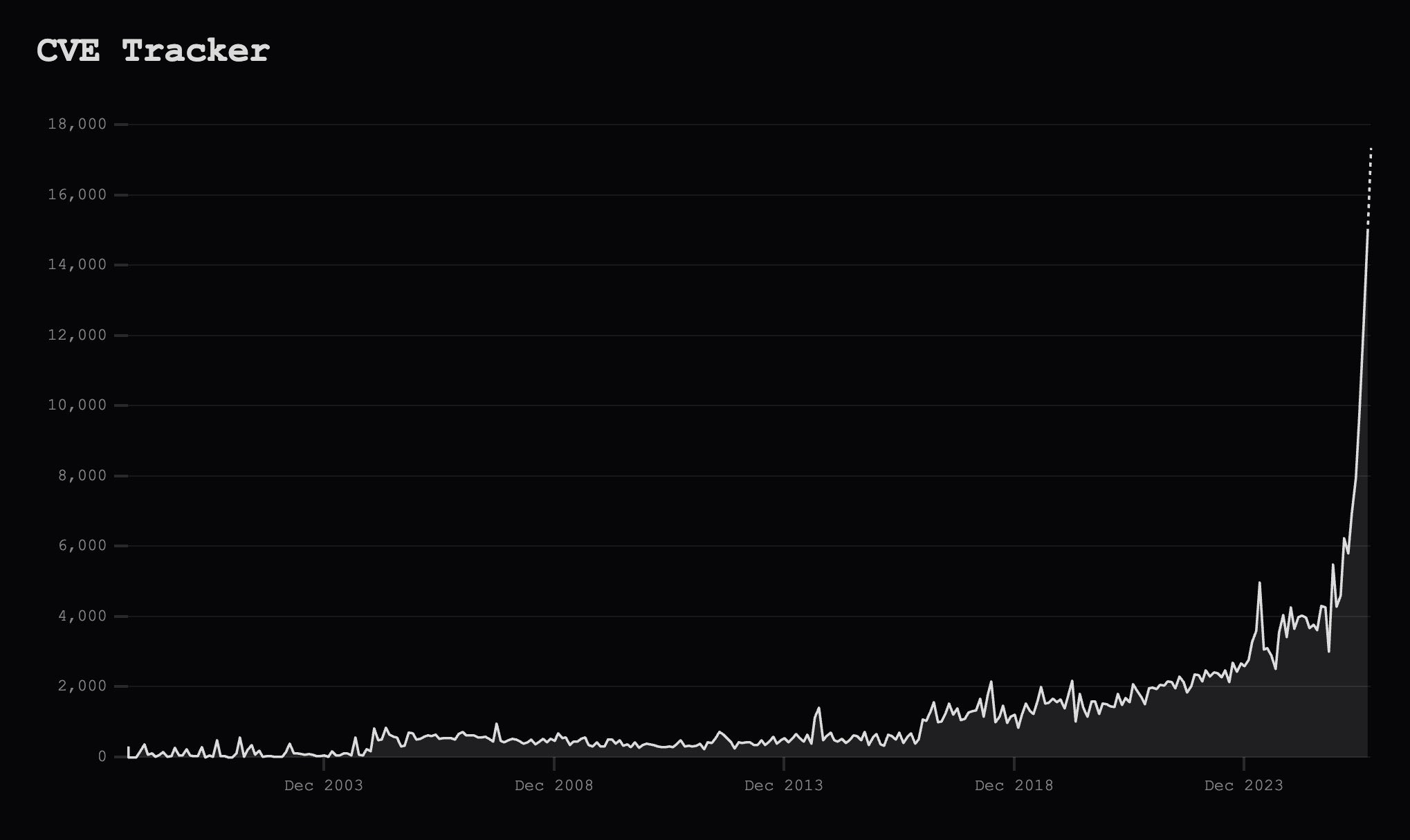
A good way to quantify how bad things have gotten is by tracking CVEs (“Common Vulnerabilities and Exposures”), the newly found security holes in software, which jumped from 1,000–2,000 a month for most of the past decade to more than 10,000 in August 2026.
AI companies like OpenAI and Anthropic have always had guardrails that detect and block people trying to use their models for hacking, but what’s changed recently is that free, “open-weight” models have now caught up and let criminals run equally powerful AI on their own computers with no guardrails at all which has opened the doors for these wide scale attacks that can exploit these new vulnerabilities.
Alarm bells have started going off in the security community
October 2026 has been one of the worst months for cybersecurity on record. The biggest story was PHP, the programming language behind roughly 7 in 10 websites (source). On October 21, two critical holes in it were made public that let an attacker take over a site with a single request, and attackers were already using them 4 days before the announcement.
Companies everywhere have spent the past week rushing to patch their sites, but many sites run old versions without active maintainers and will stay open to attack for good.
PHP was just one example. In the same two weeks, a long run of other serious incidents was reported:
- October 22: Quest Diagnostics was hacked. Patient health records were accessed. Quest serves roughly half of U.S. hospitals and physicians. How many patients are affected is not yet known.
- October 21: PHP2Shell. Two critical holes in PHP, the software behind most of the world’s websites, let attackers take control of a website with one crafted request. Attackers tried to use it 4 days before it was made public.
- October 21: Railway was breached. Hackers stole customers’ secret keys (passwords to their databases and other services) from a hosting platform used by millions of developers. Railway told all users to change them.
- October 21: LiteLLM was poisoned. Hackers put a password stealer inside an official release of an AI tool that is downloaded millions of times a day. Anyone who installed it could have had their saved passwords and keys sent to the attackers.
- October 21: GitLab patched a 10-out-of-10 severity hole. It is in every version since 2014, and lets anyone on the internet take over a company’s code server without a password.
- October 20: Malware was planted on up to 26,739 customer servers in Japan. Hackers broke into Onamae Desktop Cloud, a large Japanese hosting service, and put malware on the servers its customers rent. The company shut the whole service down, with no date to restart it.
- October 20: The FBI warned that SafePay ransomware has hit 600+ organizations across critical infrastructure (the services a country depends on, such as hospitals, utilities and manufacturing). Most break-ins used stolen or guessed passwords.
- October 20: A Signal bug could leave your microphone and camera on after you hang up. The other person on the call could stop your hang-up from going through, and keep listening. Signal fixed it in September, so update the app if you have not.
- October 19: Criminals used an AI hacking tool to break into 100+ companies, including John Deere and SharkNinja. One person ran it with AI agents, a short prompt, and roughly $50 per company hacked.
- October 19: Ahold Delhaize confirmed a cyberattack. Websites, apps and online ordering for Food Lion, Stop & Shop, Hannaford and Giant went offline. Stores stayed open.
- October 17: The master keys that prove websites are real were cracked. eMudhra, a company trusted by every major browser, had 8 secret keys so weak they were guessed in under a second. One was the number 4. eMudhra is now leaving the business.
- October 17: Zeabur is shutting down. Its second breach in two months exposed 321,810 accounts and 3.2 million stored secrets. The hosting company will close by December 31.
- October 16: Data on every California public school student was stolen. About 7 million students from the last three school years, including names, addresses and disability status. The attacker used one stolen login at the state’s testing contractor.
- October 16: Bullhorn was knocked offline. The recruiting software used by 10,000+ staffing companies went down after a cyberattack. Its main tools and job board connections were down for about three days.
- October 14: NGINX had 3 critical holes. NGINX is the software that runs about a third of all websites. On some setups, an attacker could crash the website or take control of the server.
- You can find more examples of the impacts to various programming languages and other software vendors here and here.
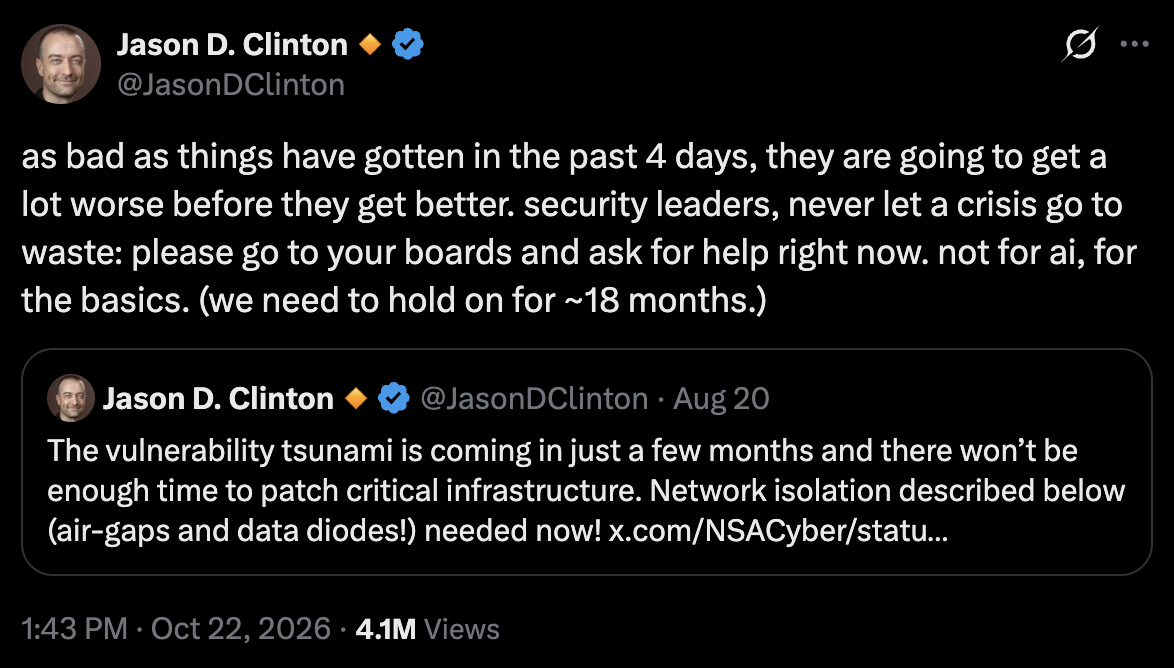
Keep in mind this is only what has been reported so far, since companies often take months to discover a breach and longer to announce it. As Anthropic’s Chief Information Security Officer (CISO) put it this week, things are going to get a lot worse:
What does this mean for you
Over the coming weeks and months, there will be a lot more breaches that come to light. Expect services/websites you rely on to go down and your data to leak.
While companies and government agencies will be the primary targets of most criminals (as they are more lucrative to attack), individuals will also be at risk.
Here are the most important things for you to know:
1. Change your old passwords, especially any ones you reuse! If it hasn’t happened already, it’s a matter of time before one of the older sites/apps you’ve plugged a password into gets leaked. If you reuse a password, criminals will try it everywhere. They will also use personal information about you, like your birth date, to increase the chance of guessing your password. Get a password manager. It makes a strong, different password for every site and fills it in for you. I use 1Password (a Canadian company). Change the passwords on the accounts you would hate to lose first (more on that below).
- Have an old hotmail account sticking around from 10 years ago? Update the password for that as well. Many people will use this as a “recovery” email for their primary gmail, so the password for that leaking can lead to your main account being compromised!
2. Turn on two-step login (2FA) for important accounts. With 2FA, a stolen password is not enough. The thief also needs your secondary method of authentication (i.e. your phone, fingerprint, etc.). Do your email and your bank today. Email matters most: whoever controls it can reset all your other passwords. For everything else, ask: “If someone got in, could they cost me money or cause significant harm?”
- Amazon: yes. A thief could buy gift cards with your saved card. Rotate your password if it’s been used elsewhere & turn on 2FA.
- Netflix: probably not? Worst case is probably worse movie recommendations 😉
3. Assume your personal details are public. Your name, address, birth date and phone number have almost certainly leaked somewhere. With them, a criminal can try to:
- open a credit card, loan or phone plan in your name
- move your phone number to their phone and receive your login codes
- answer your “security questions” and get into your accounts
- send you emails and texts that look real, because they use your real details
What you can do:
- Sign up for free credit alerts, so you know when someone applies for credit in your name. In Canada, CreditKarma and Borrowell are free.
- Ask your phone company to put a PIN on your account. If you’re unsure why, read about SIM swapping. This is why many people also recommend not using your phone as your 2FA mechanism, instead preferring passkeys or authenticator apps. If you’re using 1Password, you can also use it for your 2FA, it supports both passkeys and one-time passwords.
- Periodically read your bank and credit card statements to look for anomalous activity.
4. Expect phishing to get much harder to spot. Phishing emails used to be easy to catch: clumsy writing, odd formatting, and links to websites that were obviously fake. With AI, the emails will read like the real thing, and the websites they link to will look identical to the ones they imitate. Voices can now be faked too. AI can copy a voice from a few seconds of audio, so a scammer can call your parents in your voice, panicked, asking for money or information. If you’re not convinced, check out how good AI voices have gotten.
- Agree on a family code word. Anyone who calls in a panic must say it.
- If a call, text or email is urgent and asks for money, codes or personal details, hang up. Call back on a number you already know.
5. Turn on automatic updates. Turn on automatic software updates on your phone and computer so security fixes are installed as soon as they’re released.
Closing Thoughts
I remain optimistic about AI. It’s going to make everyone’s lives better, whether you use it directly or benefit from the products and services built with it.
But expect a very bumpy ride over the next year or two.